Introduction
So, today I’m going to walk you through its pros, its cons, and then at the end I’m going to talk about who should actually buy one. But, since I value your time, and I really do, here’s the skinny. Overall, we love what Apple is doing here. It’s very disruptive and it’s going to place enormous pressure on Windows manufacturers just to up their game, particularly in the budget space. But, on the flip side, there’s also risks to Apple marketing this device the way that they are.
If you’re sticking to light tasks like basic web browsing and office applications, sure, the Neo is viable. But, if you can find an older MacBook Air with M3 or M4 for around the same price, guys, that is a much better choice. And if you can’t buy one of those, you should carefully consider the Windows laptops that I’m going to compare the Neo to today before jumping in. There are just several of those available at this price point that bring different pros and cons to the table that may better suit your needs.

MacBook Neo Display
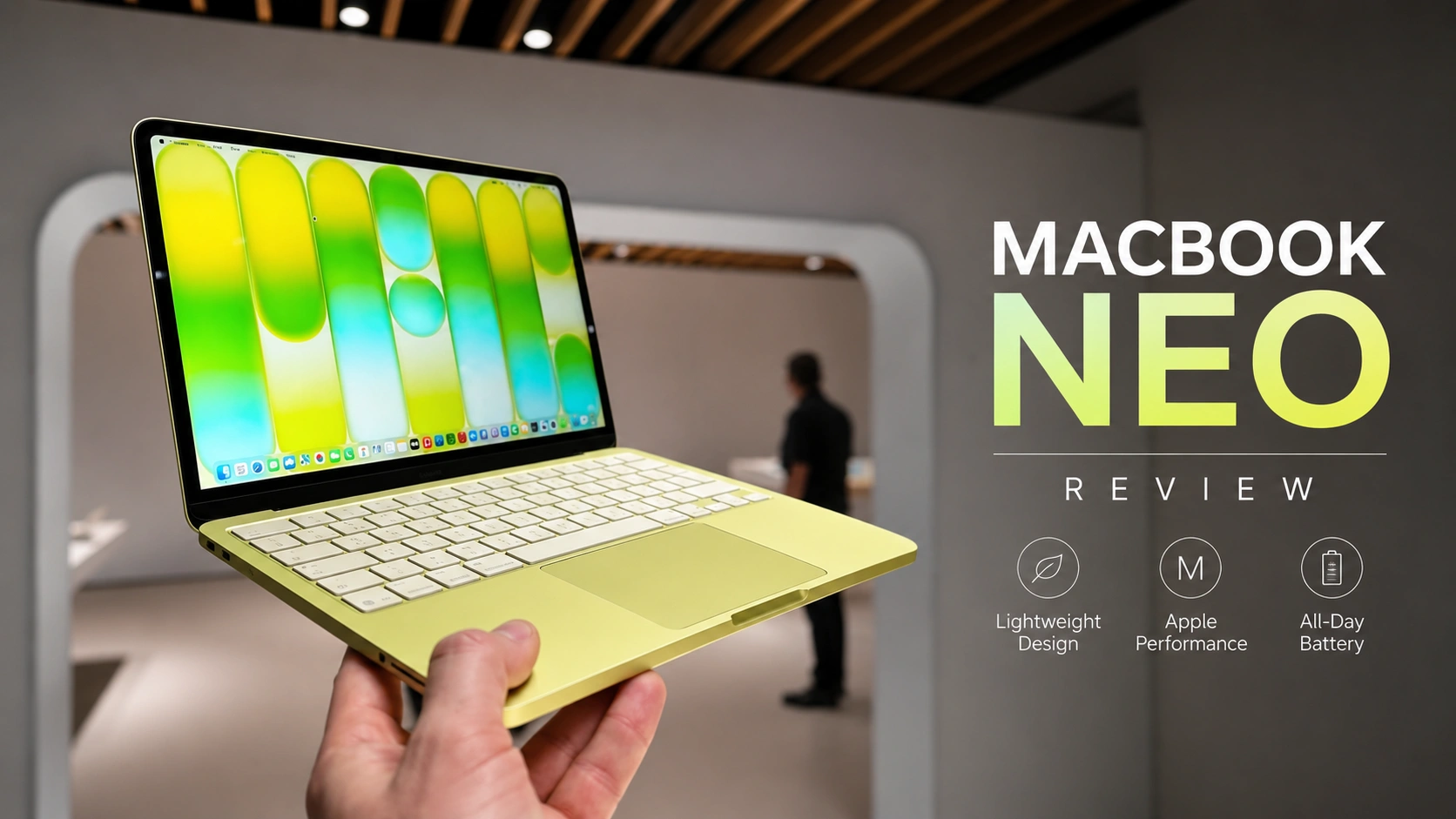
Neo’s display, it is very pixel dense at 219 pixels per inch. It basically means small text is going to look nice and crisp. Windows laptops at this price point, they often have lower resolution panels, which just don’t look as sharp. The screen gets very bright. We measured it at over 500 nits. It is a glossy screen, but because it gets so bright, it does a good job of combating reflections.
I’d say good enough to use in any indoor environment, but you’ll still struggle in direct sunlight. Rounding out the display, it refreshes at 60 Hz. Its color gamut is decent, good enough for web browsing, but not good enough for any professional color work. We didn’t detect any backlight bleed from its IPS panel, PWM flickering was nonexistent, and in case you’re wondering, the screen does not support touch.

MacBook Neo keyboard
Moving on to the keyboard, it is surprisingly good. Typing on the Neo actually feels more comfortable than typing on an Air. If you don’t know, the MacBook Airs, they do use a low-travel keyboard. With those, you kind of feel like you’re typing on a flat surface, which I don’t find comfortable. The keys on the Neo are not only comfortable to type on, but they’re also quiet. So, if you’re chatting to friends in class, you shouldn’t distract anyone else.

But, there are some big downsides to the keyboard. Firstly, there’s no backlight. So, if you use the laptop in the dark like I often do, you may find yourself just having to angle your screen down to find a key. What’s also annoying is not having a fingerprint reader on the cheaper model. You only get it on the upgraded one. If you’ve used a fingerprint reader or say face recognition before, it’s just hard to go back. Most Windows laptops, they do have one at this price point.
MacBook Neo trackpad
The trackpad is also very good. Tracking was accurate and so was the click. It is a mechanical trackpad, but it does use a completely different mechanism to Windows ones. On the Neo, you see, the click feels the same no matter where you press it. But, on Windows laptops, you can’t mechanically click it at the top because it uses a diving board mechanism. But, if you click on the bottom, it goes down a lot and you can lose accuracy.

MacBook Neo port
Ports are bad. The Neo has two USB-C ports that both support charging, but that front port, it is really slow. USB 2, 480 megabits. It’s only going to be useful for something simple like charging the laptop or plugging in a mouse, not driving an external display. Now, that other port, it is better at USB 3 10 gigabit speeds. It can drive an external monitor at 4K 60, but it seems not always. When we plugged it directly into our LG monitor, it did work.
I was even able to use the monitor as a USB hub, so I could get that super clean setup, you know, a single cable that charges the laptop and drives the external display, keyboard, and mouse. However, when I tried to plug the laptop into my Thunderbolt dock using an HDMI cable to connect from the dock to my monitor, I couldn’t go above 4K 30 Hz. I may have to do a lot of finagling here.
MacBook Neo performance
Now, normally when we talk performance, I just go straight into the benchmarks, but in this case, let’s talk about basic use first. That’s because the Neo, it uses a slightly cut-down version of the A18 Pro chip found in the iPhone 16 Pro from 2024. It’s only got 8 gig of memory, too, just like the phone. But, this version of the A18 Pro, it has one less GPU core. When I was using it for basic tasks like browsing the web, watching YouTube videos, and office work, it felt mostly snappy.
On occasion, I did experience some stuttering and I did see that spinning ball of death just more than I have on any other Mac. Our projects, they’re pretty simple, 4K 8-bit color, a couple of b-roll shots, not a lot of effects or motion graphics, and we do use Premiere Pro. To say the Neo died in a heap would be an understatement. In Activity Monitor, memory was almost always in the yellow and on several occasions hit red. This means you absolutely need more memory. Even playing the video back at a quarter resolution was crazy stuttery. And I did try playing that exact same video on our Acer with its Intel Core i5 processor and 16 gig of memory.

It was also very stuttery, but nowhere near as bad as the Neo. I know some people will be like, “You know, Josh, you should use Final Cut, it’s better optimized on a Mac.” Guys, we just don’t use Final Cut here, and I wanted one of our real projects. My two cents, the Neo is fine if you’re stitching together a family video, but that’s probably about it.


MacBook Neo Battery
All right, on to one of the most important aspects of a laptop, running it when unplugged. The good news is, the Neo, like all Macs, it doesn’t lose performance when you unplug it. Anyway, we hit the Neo with our new tougher battery life test. We’ve definitely heard from you guys that reviewers, they show unrealistic battery results, including us previously.
So, this year we’ve upped the difficulty of our test. The Neo, it lasted around 6 hours, which is pretty disappointing for a modern laptop, likely because the Neo has that smaller battery, 37 watt hours. You’ll get about 2 hours less on this laptop than a modern MacBook Air.
MacBook Neo bencmarck
All right, now that I’ve talked about the stuff that most buyers will care about, here’s the benchmarks for people like me. In Geekbench, the Neo is dead last in multi-core performance when compared to all other processors you can buy at this price point. It’s slightly less powerful than a MacBook Air with M1 that came out in 2020. In single-core, the Neo does really well. Single-core speeds can make some applications feel snappy.

Now, one thing I do want to point out is how much faster the A19 Pro chip is. That chip also comes with 12 gig of memory and hopefully we’ll see it in next year’s Neo. Anyway, let’s now switch to Cinebench, which tests the raw CPU performance. You see, Geekbench it just tests a bunch of common performance tasks and it doesn’t max out the CPU like Cinebench does. Here you can see that the Neo falls even further behind. Its single-core performance is now only on par with the M2 MacBook Air and its multi-core performance is worse.
Please note that this is the newer version of Cinebench and we didn’t have the M1 Air or the M3 Air in to test it on. Now, to really stress test this laptop, we ran Cinebench on a loop for 10 minutes. The Neo peaked at 7 watts but averaged only four, which really shows you how power efficient this chip is. During this stress test, the laptop surface temperatures were actually really cool. We measured only 36° C on the keyboard deck and the underside. Seriously, that’s really good. Fan noise was of course non-existent as there is no fan. During this same test, Windows laptops they get really loud. The budget Acer Aspire 14 not only got loud but its fan noise is high-pitched so you really notice it.
Pricing & Alternatives
All right, so let’s wrap here. There are really two ways to look at the Neo. If you’re certain that you’re sticking to basic use and the Neo’s price is the most that you can afford, it is a more complete package than Windows laptops at this price point. That is very positive and it is disruptive. It’s absolutely going to light a fire under Windows manufacturers to just do better and I think that is a darn good thing. If on the other hand you’re going to do something more than just basic use or you aren’t sure what your future needs will be or you’re someone who plans to keep your laptop for many years, I know there are a lot of you guys out there, buying a Neo it is a massive risk.
You’ll probably need to replace it sooner rather than later and ultimately, that could just cost you more money than buying a better laptop to begin with. I am extremely concerned that a lot of people are going to see one of these in a store and just think, “Wow. It feels premium, it looks great and I can get a really good deal on a MacBook.” Only to just get it home and quickly find out how limiting its performance is. Take university students. A lot of you may change disciplines or try different classes during your four-year degree.

With a Neo, there are going to be huge limitations of what you can do when it comes to things like video editing, audio engineering, music production, programming, engineering, 3D modeling, gaming, I think you guys get the picture. I am concerned that a lot of these are just going to end up in landfill within two to three years. This first generation, probably not the one to buy. If Apple ports the newer A19 Pro in a Neo with its 12 gig of memory, adds a backlit keyboard, adds a fingerprint reader to the cheaper model, it’s going to be a far more compelling offering.
Anyway, regardless of which of these two use cases that you fall into, as I said, if you can find an older MacBook Air with M3 or M4 for the price of a Neo or you can just stretch your budget a little further to get one, those are going to be far better than the Neo. And guys, if you buy a refurbished or returned model from a reputable reseller, well, you get a warranty. I’ll place some links to those older Airs down below. Now, if you can’t find one of those, I’d strongly recommend you look at Microsoft Surface. It is a very comparable laptop to the Neo that sometimes drops into this price range.
In fact, with the Neo’s launch, I’d expect to see it drop a lot more. The Surface, it also delivers that premium experience on a budget. It has a nice feeling chassis, good keyboard and trackpad, but the Surface it has much better battery life than the Neo and when I used it for light tasks, it was noticeably faster. The Surface’s main downside though is that it uses a Qualcomm processor. So, some specialist applications don’t run or just don’t run that well, but for the average Neo buyer, probably not an issue. All their apps work. On the other end of the spectrum, if you need more performance at this price point, there are a bunch of other Windows laptops like the Acer Aspire 14 that I’ve talked about today.
You can even get that laptop with a more powerful Core Ultra 7 chip for $500. That config has an even better GPU than the Core Ultra 5 one that we tested today. Unfortunately, those laptops they do feel noticeably cheaper. So, at this price point you really do have to pick your poison.
Disclaimer:
This review is based on hands-on testing, benchmark results, and real-world usage. Performance, battery life, pricing, and software compatibility may vary depending on configuration and workload. Product specifications and availability may also change over time. Apple, MacBook, macOS, and related trademarks are the property of Apple Inc.
This review is based on hands-on testing, benchmark results, and real-world usage. Performance, battery life, pricing, and software compatibility may vary depending on configuration and workload. Product specifications and availability may also change over time. Apple, MacBook, macOS, and related trademarks are the property of Apple Inc.


![Laptop Buying Guide [2026] Best Laptops under 40k, 50k, 60k in 2026](https://dizitech.in/wp-content/uploads/2026/08/ChatGPT-Image-Aug-6-2026-10_17_16-AM-768x432.webp)



![Laptop Buying Guide [2026] Best Laptops under 40k, 50k, 60k in 2026](https://dizitech.in/wp-content/uploads/2026/08/ChatGPT-Image-Aug-6-2026-10_17_16-AM.webp)