Introduction & First Look
If you’ve been looking for a way to power your computer, keep external displays, have an external SSD, and keep any other devices all plugged into your computer with a single cable, check out the
Satechi Cube Dock.
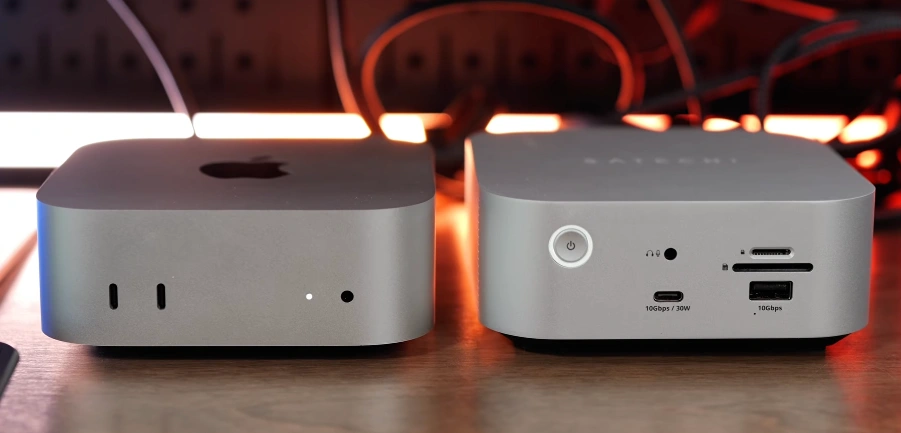
This thing is so cute, and at first glance, it looks exactly like a Mac mini. It’s almost the same exact size as the Mac mini, and they really designed this to work with any Apple computer in 2026. And what’s nice about this is it has the perfect Apple aesthetic with the awesome silver aluminum finish on it.
It’s got a lot of great features on it like ports on the front, ports on the back, and on the bottom there’s also a slot where you can put your own NVMe to add more storage to your computer.
Thunderbolt 5 & Compatibility
Going to talk about all the features this docking station has, a couple things I like about it, and a few shortcomings with this docking station. And before we go any further, I do want to say thank you to Satechi for sending me this to review.
They’ve got no input in this content. It’s just my thoughts on this docking station and who I think it’s for. This looks exactly like the Mac mini, and what’s kind of funny about this docking station is it’s actually a Thunderbolt 5 docking station.
The Mac mini comes with Thunderbolt 4 unless you get the more expensive M4 Pro chip on it. And we’ll see what other computers come out in 2026, but right now, that’s the only way to get Thunderbolt 5 on the Mac mini. I did a lot of testing with this with my M4 Max Mac Studio and a couple of other different Thunderbolt 4 and Thunderbolt 5 laptops.
All the Ports (Front & Back)
So, there’s an additional three Thunderbolt ports. There’s a 2.5 gigabit network port, USB-A and USB-C 10 gig ports on the back, and then on the front, you got a power button for shutting everything off that’s plugged into this, a headset/microphone jack, a 10 gig 30 watt port, which is perfect for keeping something like an iPad charged.
There’s also a 10 gig USB-A port. There’s also a UHS-II SD card and microSD card slot. The main claim to fame with this is actually the fact that it’s got an SSD slot on the bottom of it, so you can put your own NVMe in it. You need to make sure you put the slimmer thermal pad underneath the NVMe and put the other thermal pad on top of the SSD. It ends up just sticking to the cover on this.
It is a little bit tricky to get this in. You insert it at an angle, get the screw in, and use that to hold it down.
Display Support & Limitations
I just recommend using one of the Thunderbolt ports on it if you want to keep this plugged in to an external display. It is important to note this can actually power your computer as well. It’ll provide up to 140 W of power to your computer, and all the Thunderbolt ports are each capable of up to 15 W of power going to all of those.
One small complaint with this is the Ethernet is just 2.5 gigabit. After testing a ton of docking stations, the only ones that have 10-gig end up dropping a Thunderbolt port on the back. So, I’m okay with the slower network port because it means more Thunderbolt ports on the back of this.
There are some interesting limitations with this, and some of these are due to macOS. Namely, the fact that you can only do triple display with this dock if you’re using it with the M5 Pro or M5 Max chip. Otherwise, this does top out at running with two external displays. This also does support the 120 Hz Apple Studio Display XDR.
Let’s talk some more about the pricing and the value on this. If you buy a typical Thunderbolt 5 docking station and a Thunderbolt 5 SSD enclosure, then that’s going to run you over $500. The Satechi Cube Dock is currently going for $400, and Satechi often has a lot of great sales. Be sure to check links in the description below for the best current prices on this. There are a couple
Alternatives (OWC, Sonnet, Razer)
alternatives to this that stack up pretty similarly with it, like the OWC Thunderbolt stack comes in at $330. It’s not technically a docking station. There’s no network port on it. It also doesn’t have an SD card slot. There’s no headset jack on it. The OWC Thunderbolt stack is bigger. It does have an SSD slot, and it also has a spot where you can put a standard spinning disk hard drive on it.
It’s also got three USB A ports versus the four total USB ports that this one has. So, there’s some trade-offs you make with it. Sonnet also has an SSD docking station that has the Thunderbolt host port on the front of it, and I like that it gives you one of the faster Thunderbolt 5 ports on the front of the Sonnet one, so you can keep faster external SSDs plugged in it. But, the Sonnet one has two less C ports. It has two more USB A ports, so it’s kind of a wash.
The Sonnet docking station is $300 for an empty one. It doesn’t look quite as nice and clean as this one, and it’s also made of plastic, too. Razer also has a docking station that stacks very well against this one, but with the Razer one, all the ports are on the back, and it does have one less USB C port, and it’s about the same price as this one. The Satechi CubeDock does stack up really well against the competition, even though I wish it was $75 cheaper.
Overall, I really love the look and the design of this. I think this is what people wanted Satechi to release when the M1 Mac Mini came out, because this comes from a reputable brand, it’s super compact, it matches perfectly, and it’s so versatile whether you want to use it with a Mac Mini or a laptop, or even a Mac Studio.
This is a great option, very reliable. I think the only downside to this is the fact it should have been about $75 cheaper, and then it would be a no-brainer.
But, what do you think? Do you like the Satechi CubeDock? Would this be enough to keep all your devices plugged in, or would you need something bigger, like the CalDigit TS4 Plus? Let me know in the comments below what you think.
Disclaimer: This review is based on publicly available information, manufacturer specifications, and hands-on testing where applicable. Product specifications, pricing, availability, and features may change over time. Some links in this article may be affiliate links, which means we may earn a commission at no extra cost to you if you make a purchase. All trademarks, product names, and brand names mentioned are the property of their respective owners. Always verify the latest details on the manufacturer’s official website before making a purchasing decision.








![Laptop Buying Guide [2026] Best Laptops under 40k, 50k, 60k in 2026](https://dizitech.in/wp-content/uploads/2026/08/ChatGPT-Image-Aug-6-2026-10_17_16-AM.webp)